2 Technical Assistance
Entries in this section (18)
- 2.1 What is the latest version of Darklands?
- 2.2 Bugs encountered in v483.07
- 2.3 What files are available for Darklands?
- 2.4 Running Darklands in Windows 9X
- 2.5 Running Darklands in Windows ME
- 2.6 Running Darklands in Windows NT/2000
- 2.7 Running Darklands in Linux
- 2.8 Why doesn’t my SoundBlaster sound right?
- 2.9 Battlefields scroll WAY too fast on my box. Any suggestions?
- 2.10 How do I run Darklands today?
- 2.11 “Out of memory”, “no EMS” or “not enough memory”: what now?
- 2.12 Where and when can I save?
- 2.13 Is saving and reloading cheating? What changes when I reload?
- 2.14 Does Darklands need the code sheet?
- 2.15 Which keys should I know? What do the difficulty levels change?
- 2.16 The manual and the clue book: which should I believe?
- 2.17 Is there a German or other translation?
- 2.18 What command-line options does the game have?
2.1 What is the latest version of Darklands?
The latest version of Darklands is v483.07. If you don’t know what version you have, check out the BANNER.DAT file which should contain the number of the latest version. This is the file that appears as a grey screen when you first boot the game up. In my version 5, the file flashed by so rapidly that I couldn’t tell which version it was, so I used a DOS utility like DR.EXE (you could also use WRITE or NOTEPAD from WINDOWS) to open the BANNER.DAT file and read the number. If you use a text editor, don’t save afterwards. Just exit.
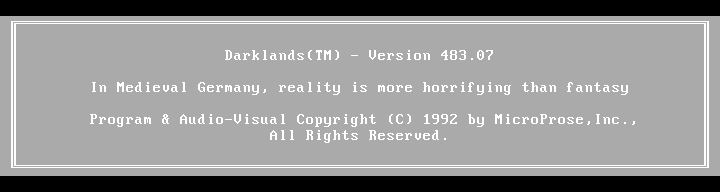
The versions released were 483.04 (August 1992), 483.05 and 483.051, 483.06 (September 1992) and 483.07 (February 1993), plus a later sound update. The copies sold today on GOG and Steam are 483.07. The patches survive on darklands.net and in the files of the Darklands mailing list, but they must be applied in order: the 483.07 update installs only over 483.06, so 483.04 and 483.05 must be brought to 483.06 first.
Technical and other considerations for version 483.07 (February 26, 1993) as quoted from the README.TXT that accompanies update v7:
Where the README is wrong
The game’s program shows a few of the README’s statements to be wrong or incomplete:
- Any key skips the opening, not only the space bar.
/Qswitches off all three films: the opening, the death of the party and the ending. - Saving in battle is allowed whenever the party is not in real combat, which also means before any enemy has noticed you. The tombs and crypts qualify besides the mines, the Templars’ fortress and Baphomet’s citadel. Fights in castles and keeps never allow a save. See 2.12.
- The 100 saved games are not a limit the program enforces; it names each save
DKSAVE0.SAV,DKSAVE1.SAVand so on, taking the first free number. The load screen shows nine at a time, and Home and End work as well as the arrows. - There is no “Freiburg B”. Both towns are “Freiberg” in the game’s own data; the one in the Breisgau is “Freiberg-im-Breisgau” in full. Only the title “Count of Freiburg” has the right spelling. Tell them apart on the map: Freiburg lies in the south-west, Freiberg in the Wettin Lands near Dresden.
- Loading from inside the game. You can still answer No to “Loading is irreversable. Proceed?”. After Yes, the party and the game’s events are already cleared, so if you press Esc on the load screen you go on playing with an empty party. Always pick a saved game.
- There is an ending, with its own film, and the game goes on after it. 4.16 describes it, behind a spoiler.
- The Hall of Fame routine and its file, DARKLAND.FAM, with five sample parties in it, are on the disk, but the game never calls them. The Party Information screen (F6) names your fame instead, in steps of 50, from “Unknown” to “Legendary Heroes” at 500 or more.
2.2 Bugs encountered in v483.07
The travel map keeps only part of the map file in memory and reads the rest from disk when the view jumps; that is the disk activity. Version 483.07 has two bugs in this scrolling: scrolling north shifts the wrong number of rows, and the scroll at the bottom edge moves the view without reading the new rows. The map can then be drawn, and the party’s next step judged, from the wrong rows, which can mean sea. That fits the symptom, though the endless scrolling and the hang have not been reproduced.
Some wilderness and city battlefields hold their enemies back on purpose: the fight starts with an empty map, and the enemies appear around ten seconds later. Separately, version 483.07 has a bug that drops every enemy of a level when the first enemy group on it comes out empty; then the battle has no enemies at all.
In the program as shipped, the kobolds’ human leader answers a parley with one line (“you must help us defeat the dwarfs… you must leave here at once!”), greys out the parley choice and shows the menu again. No path to an empty screen has been found. If you can make it happen, keep the saved game.
My characters’ hair and clothes turned bright green or pink. What happened?
This is the “character colors” problem of the README above, and it is still unexplained. Each party member’s battlefield colours are a small table stored in the saved game, which is why the change survives saving and why an older save repairs it. The table sits in memory right behind the image of the battle floor, so something writing past that image would explain it, but no such write has been found.
The game stops with “no such file” for XHOUND.PIC or XMOBGLAD.PIC
These two pictures first came with version 483.06. A copy that missed the 483.06 update, for example 483.05 patched straight to 483.07 or an incomplete copy, lacks them and crashes to DOS when a scene needs one. Install the patches in order, or copy the two files from a complete 483.07 into the PICS folder.
The game freezes or goes black when a battle starts
Players traced it on real DOS and old Windows to memory or sound-card settings, and those who moved to DOSBox reported that it went away. See 2.10 and 2.11.
The ladders in the mine send me round in circles
Players have long reported mine levels whose ladders seem to loop. Its cause is not known. Try another ladder, or go up and come back down.
I suddenly have 256 hand axes
If an alchemist’s brew is called off before it finishes, for example by changing the alchemist’s activity in camp, the game gives the ingredients back. Because of a bug it also gives back the formula’s unused ingredient slots, as stacks of item number 0 with a count of zero. Item number 0 is the Hand Axe. That is the likeliest source of the odd hand axes players have found after brewing.
I killed the robber knight, and now I can kill him again and again
It is an original bug: after the knight dies in his burning tower, the game sends you back to the tower instead of the map. 4.8 has the details.
The Bugs & Oddities page lists every original bug the restoration has found, about two hundred in all, each with its place in the program.
2.3 What files are available for Darklands?
There are quite a few files available for Darklands:
- Patches. The 483.06 and 483.07 updates and the sound update, on darklands.net and in the Files section of the Darklands mailing list (darklands@groups.io).
- Editors. Character and saved-game editors have been written since the 1990s; the mailing list’s Files section keeps them, and new ones still appear.
- Maps, saints, formulas, music. darklands.net, Matt Wirkkala’s site, gathered them on its Tools and Music pages (also kept in the Internet Archive). The restoration’s file formats pages describe every data file of the game, with the full tables of cities, saints, formulas, items and enemies.
Most of the files have descriptions and/or readme files included.
2.4 Running Darklands in Windows 9X
Version 3.0 left this entry empty. See 2.10 for today’s answer.
2.5 Running Darklands in Windows ME
2.6 Running Darklands in Windows NT/2000
Under 2000 (and possibly NT), the memory settings have to be tweaked so that Win2K can simulate the memory types that Darklands needs. Simply right click on DARKLAND.EXE and choose “Properties”. Select the “Memory” tab and adjust the settings like so:
- Conventional (Total) - 640
- Conventional (Initial environment) - 1024
- Expanded (EMS) memory - 16384
- Extended (XMS) - none
- MS-DOS protected - 6144
2.7 Running Darklands in Linux
WinE is a Windows emulator that can handle most DOS programs that will also run under Windows. If you want much lower overhead and run in strictly a DOS commandline type environment, then use DOSEMU.
Entries 2.4 to 2.7 are kept for the record: Windows 95 to 2000, WinE and DOSEMU are history. On any system today, use DOSBox, as described in 2.10.
2.8 Why doesn’t my SoundBlaster sound right?
Actually, this was a problem for any sound card later than Creative Labs’ Sound Blaster 16. After that version, Creative Labs used a different chipset for MIDI playback and DOS games sounded terrible.
In 2001 the answer was VDMSound, which emulated a Sound Blaster under Windows NT and 2000. Today DOSBox emulates the cards Darklands knows, so the problem is gone. INSTALL records your sound card in CONFIG.DRK, and the game turns it into the letter of the driver file it loads: A (ASOUND.DLC) for AdLib, Covox and the first Sound Blasters, P for the Sound Blaster Pro 2 and the Pro Audio Spectrum, R for Roland, I for the PC speaker, N for none. It plays the spoken words of the opening and the ending only with an A or P driver. That is why the README’s trick works: it puts the Roland driver into the A and P files, so the game plays Roland music and still speaks. For the best music, choose Roland and give DOSBox the MT-32 ROMs.
A sound update after 483.07 (README.SND) brought back Roland together with a Sound Blaster, which worked in versions 5 and 6 but broke in 7, and added Gold Sound Standard boards such as the AdLib Gold.
2.9 Battlefields scroll WAY too fast on my box. Any suggestions?
In the old days: get a slower box for playing DOS games, or try MoSlo. Today, in DOSBox, lower the cycles setting until battles and the map run at a pace you like; the GOG and Steam versions come with a setting that works.
2.10 How do I run Darklands today?
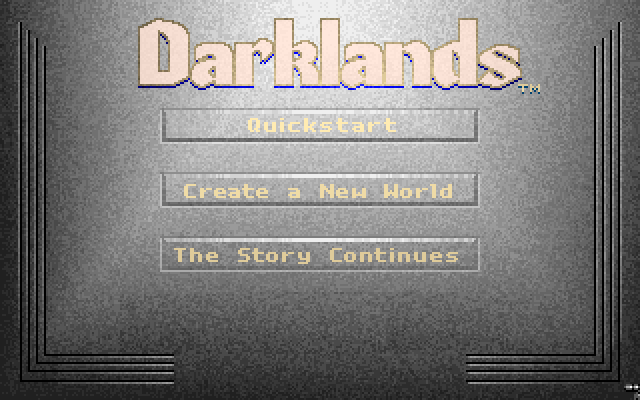
The GOG and Steam versions come set up to run in DOSBox. DOSBox itself runs on Windows, Mac and Linux. With a boxed or older copy, install DOSBox yourself, mount the game’s folder as drive C and run DARKLAND. DOSBox supplies the expanded memory the game needs, and emulates its sound cards.
The Darklands Restoration Project’s version runs the game natively on Windows, without DOSBox, using the data files of your own copy; see the project FAQ.
2.11 “Out of memory”, “no EMS” or “not enough memory”: what now?
Version 483.07 needs 581K of free conventional memory and 176K of expanded memory (EMS). On real DOS that meant a boot disk or a CONFIG.SYS with EMM386.EXE RAM and as little else loaded as possible. In DOSBox, check that ems=true, which is the default. The command-line switch -O (see 2.18) shows the memory figures and lets you go on even when there is too little, at your own risk.
2.12 Where and when can I save?
Save with Alt-S, load with Alt-L, or through the menu bar (F10 or the right mouse button). Both are switched off in the inn’s party roster, on the stay or camp screen, on the character sheet and in shops: leave those screens first.
In battle, saving works on the battlefields the game keeps between visits (the mines, the Templars’ fortress, tombs and crypts, Baphomet’s citadel) whenever the party is not in real combat, that is, before any enemy has noticed you or after the last one is down. If you can move as a group, you can save. Fights in castles and keeps never allow it. A save made on such a battlefield writes two files, DKSAVEn.SAV and DKSAVEn.BSV; keep them together. The save comment can be 23 letters long.
The game you are playing cannot be deleted from the load screen.
What does a saved game not keep?
The party’s standing with the Fugger, the Medici and the Hanse is not saved at all: after a load you keep the values of the game you were just playing, or zero after starting the program. Every saved game also keeps its own copy of the world’s places (cities, castles, mines), taken when the game was started. That is why the README’s fixes to that data, such as the one for leaving Graz, only show in a new game.
2.13 Is saving and reloading cheating? What changes when I reload?
That is up to you; players have argued both ways for decades. What a reload can change, and what it cannot:
- Fixed for the whole game: each town’s shop stock, the alchemists’ formulas and philosopher’s stones, and the nature of each castle’s lord. These come from a number drawn when the game was created, so reloading never changes them.
- Rolled again: most outcomes that depend on chance at the moment they happen, such as encounters on the road and the results of choices in a scene, because the game’s random generator is not stored in the saved game.
2.14 Does Darklands need the code sheet?
Yes, unless you play the restoration. The copy check comes when you go out onto the travel map: the game shows four of its twenty alchemical symbols and asks which one stands for a named substance; the answers are in the manual. A wrong answer ends the program. The first question comes after your first month of play, and then roughly every 22 months of game time.
The GOG and Steam versions include the manual. Players also made a set of the symbols with their answers written in, kept on darklands.net. An oddity of the check: the key 5 is accepted as the right answer, whatever was asked.
2.15 Which keys should I know? What do the difficulty levels change?
| Key | Does |
|---|---|
| Alt-S / Alt-L | Save / load |
| Alt-D | Difficulty: Basic, Standard, Expert, in turn, at any time |
| Alt-P | Pause |
| Alt-O | Party order |
| Alt-M / Alt-F | Music / sound effects on or off |
| Alt-C | Show or hide “saintly changes” (temporary boosts wearing off) |
| Alt-Q | Quit to DOS |
| F1 to F5 | Character sheets |
| Ctrl-F1 to Ctrl-F5 | Make that character the leader |
| F6 | Party information (fame, money, reputation) |
| F10 or right button | Menu bar |
The difficulty level changes four things:
- Fame. Every reward of fame is two thirds on Basic and half as much again on Expert.
- Skill gains in battle. When a skill improves in battle, it rises by 1 to 3 points on Basic, 1 to 4 on Standard and 1 to 5 on Expert.
- Choices. On Basic, a scene’s “use an item” and “call on a saint” choices are always offered, even when nobody in the party has the item or knows the saint.
- What a choice tells you. A choice’s chance of success is shown in percent on Basic, in words (“poor” to “superb”) on Standard, and not at all on Expert.
2.16 The manual and the clue book: which should I believe?
The clue book, where they differ. The manual went to print well before the game was finished, and parts of it describe things that were cut. Hendrick, who wrote both, said on Steam in 2017 that where they conflict the clue book is the more accurate, since it could give the data and formulas the manual had no room for. The clue book has errors too: the game has St. Peter needing Virtue 58, not 53, for one (see section 6).
The GOG and Steam editions include the manual and, with GOG, the clue book and the map. Boxed copies of the clue book still turn up second-hand.
2.17 Is there a German or other translation?
MicroProse published a German edition of 483.07, dated 1 March 1993; it is the same version, translated. A fan project to translate the game into Spanish began in 2022.
2.18 What command-line options does the game have?
DARKLAND /Q: no opening, death or ending films.DARKLAND /O: show the memory figures, and go on even when there is too little memory.DARKLAND /Ax: use the sound driverxSOUND.DLCdirectly, for example/ARfor Roland, instead of the one INSTALL chose.
- works as well as /. Anything else stops the program with “Unknown argument”.