Devlog #064 - Darklands in higher resolution
In devlog #063, we showed what a restored Darklands picture might look like on a modern display. The original composition remained in charge, but the little 320×200 window was allowed to breathe: timbered houses regained texture, distant streets recovered depth, and seasonal versions could change the weather without changing the place.
Those prototypes answered an artistic question. They did not yet answer the engineering question:
How can the reconstructed game use new high-resolution pictures without changing, weakening or replacing the faithful 320×200 game?
The answer is no longer theoretical. The engine now has two real presentation paths. The first reproduces the original indexed frame exactly. The second can place a restored 1920×1080 picture behind the original Darklands message card, text, party panel and choices. Both consume the same reconstructed game state. Both send the same actions back to the same controllers. And when the enhanced path cannot present a screen completely, it falls back to the original screen as one indivisible whole.
This devlog is about the architecture that made that possible.
The Game is not the Window
Darklands was designed for a 320×200 VGA display. Its pictures, card borders, fonts, party panel and mouse regions all assume that canvas. It would have been easy to let those assumptions spread through the new C# application: make the SDL window pretend to be 320×200, feed its mouse coordinates directly into the old rectangles, and treat the final framebuffer as the only thing a frontend can ever know.
That would work—until we wanted anything else.
A 1920×1080 background does not fit inside a 320×200 framebuffer. A modern choice panel may not sit where the original rows sat. A Unity frontend will not want SDL textures or SDL events. Seasonal scenery, tooltips, accessibility layers and animated weather should not be decisions made by the reconstructed DOS gameplay code.
So the project now keeps three responsibilities separate:
Darklands.Engine
    owns what the reconstructed game means and does

Darklands.Host
    describes what a frontend may present and which action the player requests

Darklands.DevHost
    implements the current SDL window, textures, input and audio devices
The core layer remains below all of this. It does not know whether a picture is shown at 320×200, restored at 1920×1080, displayed in SDL, or one day assembled from Unity sprites. It still produces the same game decisions, resource identities, text, selectable owners, time effects, random results and state transitions.
This develops the principle described much earlier in devlog #034. The implementation has evolved considerably since then, but the rule has become clearer: the engine owns the game; a presenter owns the view.
Every Scene carries its own Lifeboat
The central value passed to a presenter is now a host scene snapshot.
A snapshot may contain useful semantic information: the active MSG card, its picture source, the current interaction phase, the ordered display rows, the selectable rows, their original owner ordinals, the hovered choice, merchant stock, or residence-planner state. A future frontend can use those values to build a very different layout without reading pixels or guessing what a line of text means.
But every snapshot also carries something non-negotiable:
LegacyVisualSurface
    exact indexed Frame
    exact 256-colour palette
    exact source identity
    exact visual authority
That surface is the lifeboat. It means that no screen has to wait for a modern replacement before it can run. If an enhanced presenter does not understand a scene, if an artwork file is missing, if a popup has not yet been migrated, or if an optional pack is not installed at all, the frontend can always display the exact faithful frame.
Classic mode is therefore not a temporary compatibility layer that we expect to delete. It is the permanent reference presentation of the reconstructed game.
Presenters, not modes hidden in the Engine
SDL now has a presentation coordinator rather than one monolithic rendering path. It selects a concrete presenter for the current snapshot.
The two implemented profiles are:
- Classic, which presents the exact original indexed surface;
- Enhanced Faithful, which may substitute a restored picture while preserving the original interaction and user-interface composition.
A third profile, Enhanced Modern, is reserved for later work. That is where rows could move into a larger side panel, portraits could become independent widgets, and the interface could use native high-resolution cards and fonts. It is intentionally not faked today.
The selection rule is simple:
requested Classic
        → Classic presenter

requested Enhanced Faithful
        → enhanced presenter, only when the whole scene is supported
        → otherwise complete Classic fallback
The presenter does not choose where the party travels or what a menu option does. It chooses only how the already-decided scene is shown.
A 320×200 Game in a 1920×1080 Window
Before adding restored artwork, we first had to remove a quieter limitation. The original SDL path changed the renderer’s logical size whenever the source frame changed. The startup banner used 720×400. The graphical game used 320×200. SDL then quietly translated mouse coordinates into whichever logical space happened to be active.
That was convenient, but it tied together four different things:
the physical window
      ≠ the renderer's drawable surface
      ≠ the presenter's design canvas
      ≠ the original Darklands framebuffer
They are now treated as separate coordinate spaces.
Classic presentation still uploads only the small original texture. It does not construct a giant 1920×1080 copy of a 320×200 image in managed memory. The presenter calculates an explicit destination rectangle, clears the unused area, and lets SDL place the small nearest-neighbour texture inside the actual output.
For a 320×200 game surface inside 1920×1080, preserving the original 16:10 proportions gives:
original surface     320 × 200
scaled content      1728 × 1080
left margin            96 pixels
right margin           96 pixels
Nothing is stretched and nothing is cropped. The same calculation works for a resizable window, 1440p, 4K, or a high-DPI display.
The startup banner retains its own 720×400 proportions. The host no longer pretends that every visual source and every physical output are the same size.
The Mouse had to follow the picture
Drawing the image in the right place is only half the problem. A button that looks correct but clicks ten pixels away from itself is not correct.
Input now follows an explicit route:
SDL window coordinate
        ↓
renderer drawable coordinate
        ↓
presenter design coordinate
        ↓
legacy 320×200 coordinate, when the faithful layout needs one
This matters particularly on high-DPI systems, where a window may report 960×540 input coordinates while the renderer owns a 1920×1080 drawable surface. It also means that the black margins around an aspect-preserved image are genuinely outside the game. Clicking there does nothing, and moving there clears hover state rather than leaving a row or popup permanently highlighted.
The old scene-specific hit tests still receive the exact 320×200 coordinates they expect in Classic mode. We changed the transport, not the original interaction geometry.
A High-Resolution Picture, the Original UI
With the output pipeline separated, we could build the first real Enhanced Faithful presenter.
The deterministic proof uses $PARTY02.MSG card 6 and its original
PICS\XMS108.PIC background. This was a useful test because it contains the
full generic Darklands message composition:
- a picture-backed scene;
- the ornamental card frame;
- illuminated initial and body text;
- visible and selectable rows;
- hover state;
- the party panel;
- real acknowledgement and selection behaviour.
The enhanced presenter draws two textures:
restored 1920×1080 background
              +
exact legacy message UI with transparency
              =
Enhanced Faithful scene
The background texture is decoded once and cached. Hovering a row does not reload a multi-megabyte PNG. Only the small UI layer changes when the message, rows or highlight state change.
Although $PARTY02 card 6 is the proof route, the presenter is not hardcoded to
that document. It works from the exact picture identity requested by the clean
message presentation. Other picture-backed generic MSG scenes can use the same
path when a valid restored asset is mapped and the complete UI phase is
supported.
Five Enhanced Faithful Examples
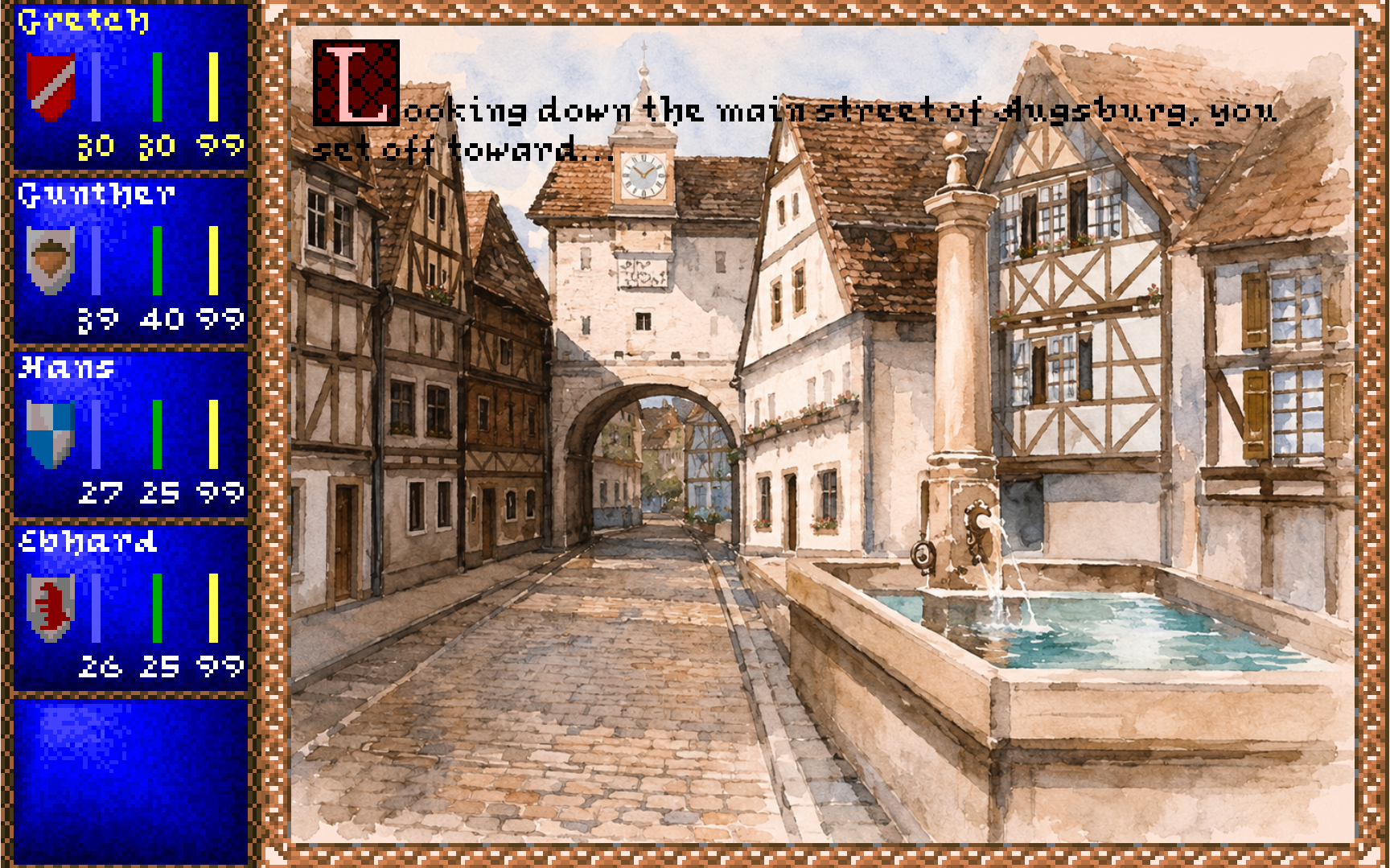
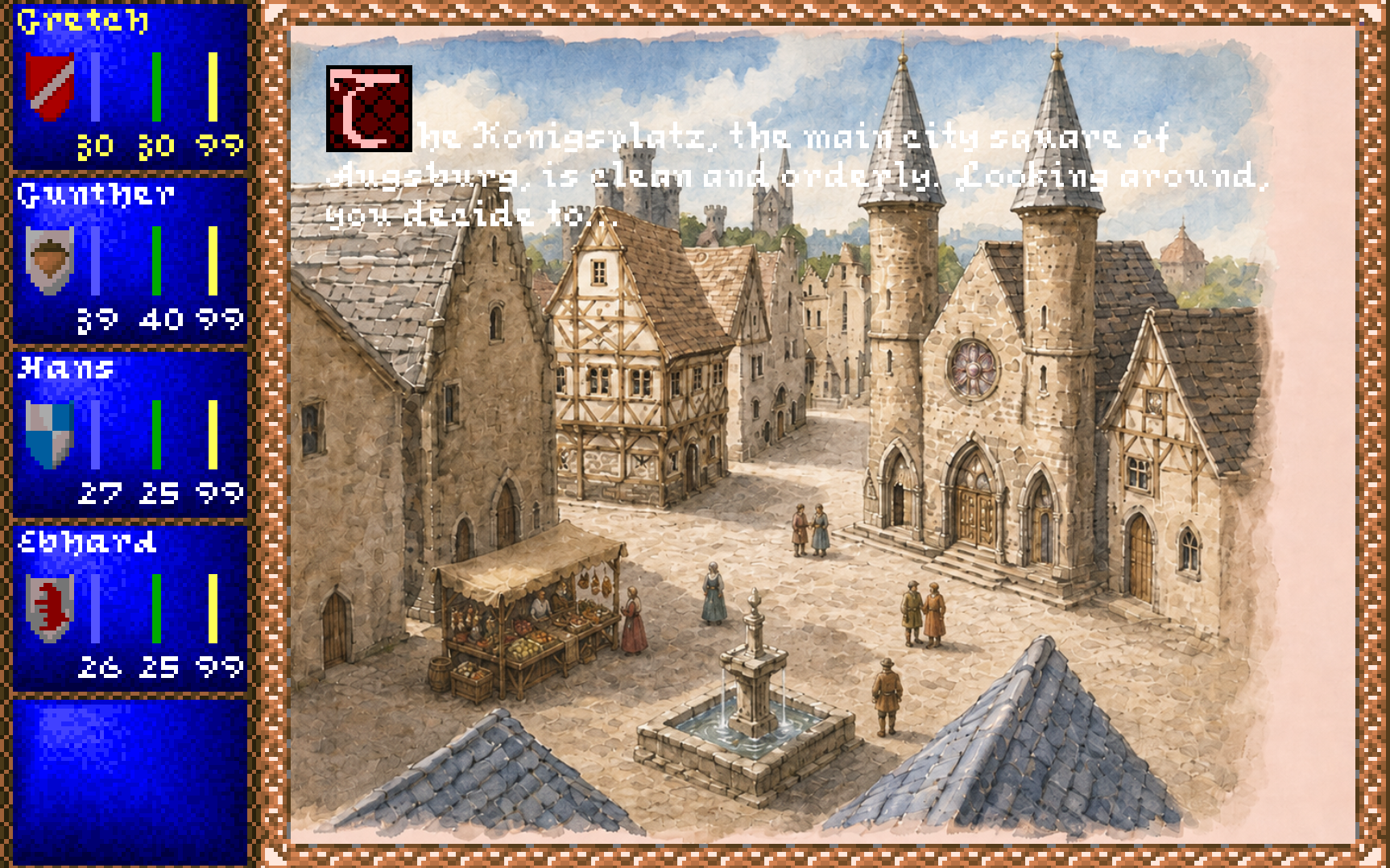
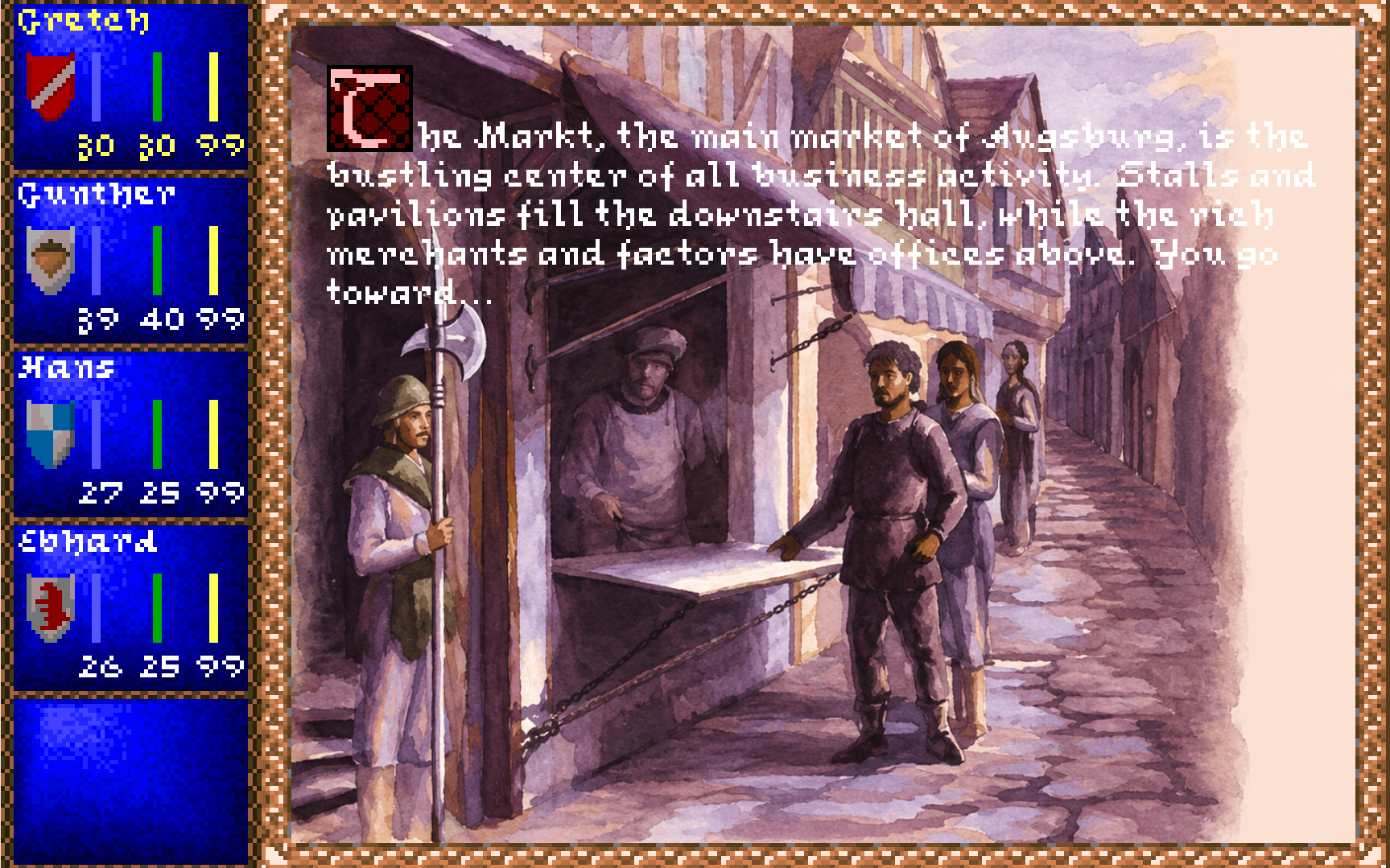
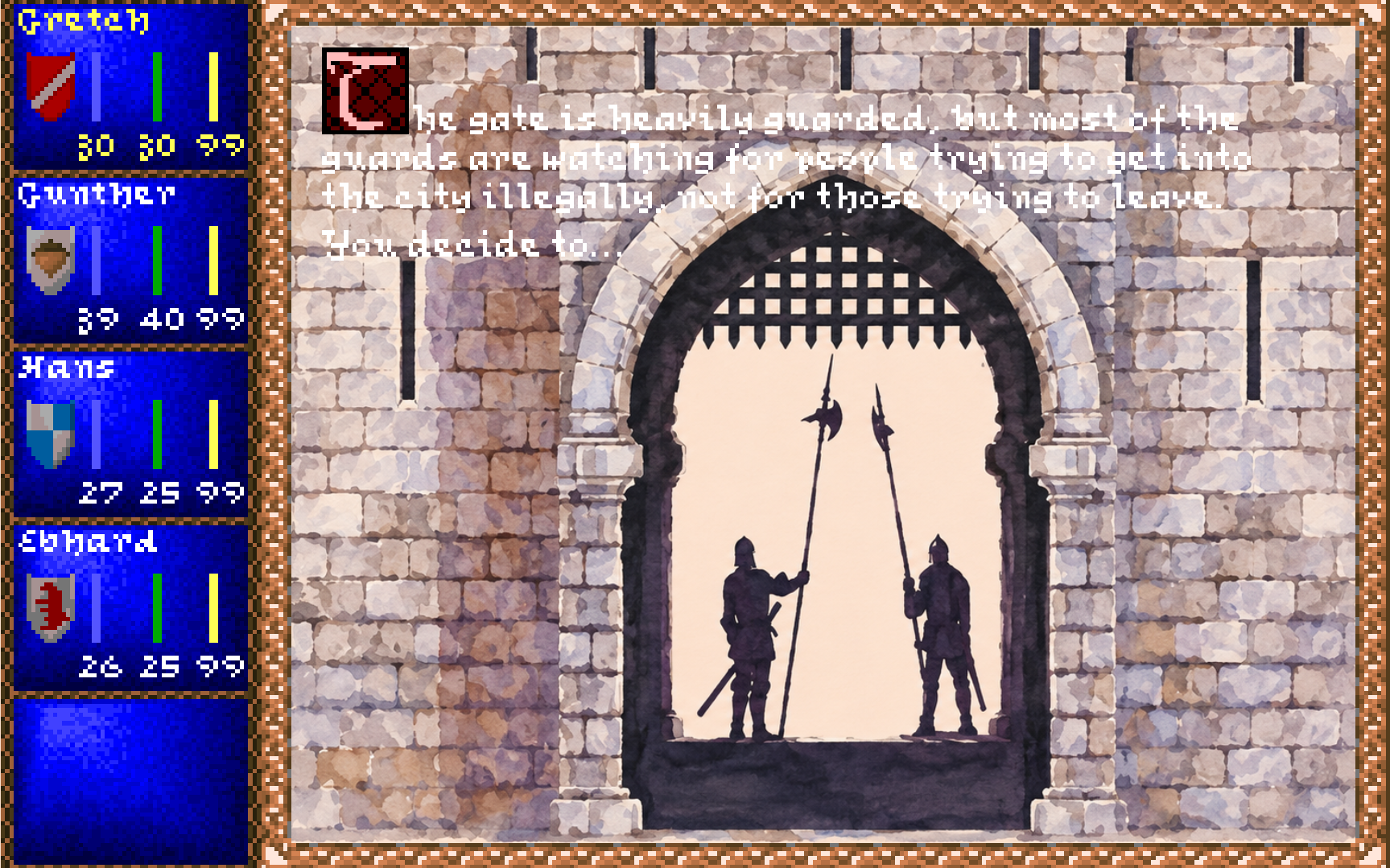
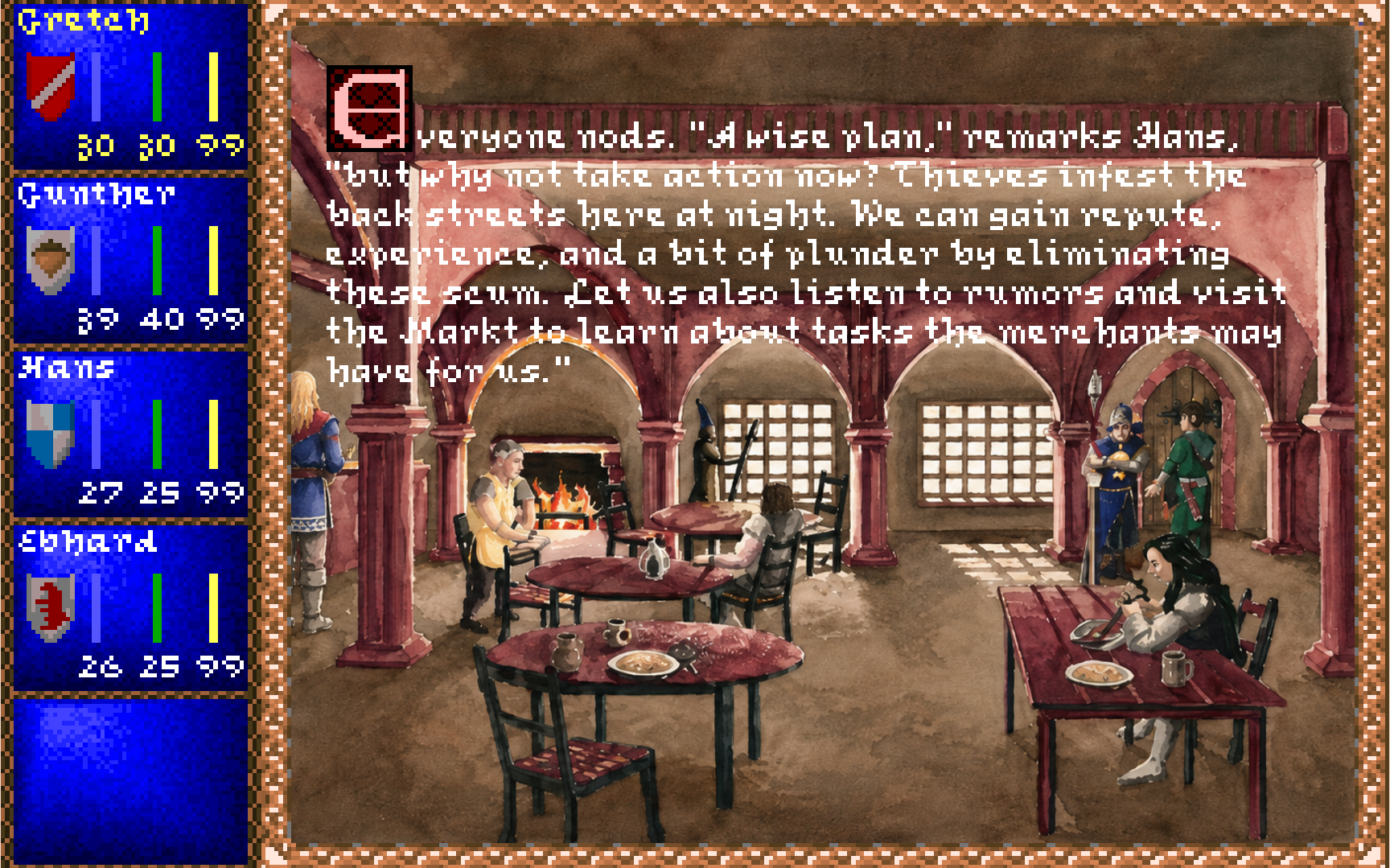
The same composition can be previewed across several mapped picture-backed scenes. The screenshots below show Main Street, the City Square, the marketplace, a city gate and an inn. In each case, a restored high-resolution picture sits behind the original Darklands card, bitmap text, choices and party panel.
These examples demonstrate the presentation direction; they are not a claim that every screen family has already been migrated. Click any image to open the original PNG at its full stored resolution.
Transparency could not be guessed
Separating the original UI from the original background was more subtle than it sounds.
A tempting shortcut would be to render the complete legacy frame, compare it with the background, and treat every changed pixel as opaque. That fails when a UI operation deliberately writes the same palette index that was already under it. The pixel looks unchanged, but it still belongs to the UI and must cover the restored background.
Instead, the generic MSG renderer now records opacity while it performs the actual draw operations. When it paints the card border, illuminated capital, text, choices, hover colour or party panel, it marks those pixels in a separate mask.
The renderer therefore publishes three related surfaces:
exact background backing
exact complete legacy frame
explicit legacy UI overlay and opacity mask
Classic mode composes the same exact frame as before. Enhanced Faithful uses the explicit overlay. No transparency is inferred from a screenshot or from a lucky difference between two colours.
This is the kind of invisible detail that determines whether a presentation system remains trustworthy when hundreds of pictures and many palette cases are added later.
The Manifest uses original Names
An optional enhanced asset pack contains a strict manifest.json. Its job is
to map an original Darklands picture identity to a restored PNG:
{
  "schemaVersion": "darklands.enhanced-assets.v1",
  "designSize": {
    "width": 1920,
    "height": 1080
  },
  "pictures": [
    {
      "originalResource": "PICS\\XMS108.PIC",
      "file": "pictures/XMS108.png",
      "legacyContentRectangle": {
        "x": 96,
        "y": 0,
        "width": 1728,
        "height": 1080
      }
    }
  ]
}
The engine does not say, “This card seems to happen in a city, so choose a city
painting.” It says, “The original owner requested PICS\XMS108.PIC.” The
presenter can then look for an exact restored counterpart.
The manifest rejects duplicate resources, unknown fields, missing files, incorrect image dimensions and paths that escape the asset pack. It does not select art from MSG text, destination states, screenshots or filename similarity. Restored art remains attached to the same canonical identity as the original picture.
No production high-resolution pack is bundled with the engine. The feature is optional, and the game remains complete without it.
Falling back is part of the Design
The enhanced path currently supports a bounded class of picture-backed generic MSG scenes. Many other surfaces are not migrated yet:
retained-framebuffer messages
alternate candidate popups
solid-fill message surfaces
merchants and residence planners
Party Info and character sheets
specialist storage and recruitment screens
native high-resolution cards, fonts and party widgets
Those screens do not receive a half-finished presentation. They use Classic in its entirety.
The same is true when an asset is missing or malformed, or when the developer console is visible. The coordinator reports the fallback reason once and presents the exact legacy frame. Returning to a fully supported mapped scene restores Enhanced Faithful automatically.
This atomic rule is important:
A restored background is never allowed to appear without every control the player needs to understand and operate the scene.
Fallback is not failure hidden from the user. It is what allows enhanced coverage to grow picture by picture and screen family by screen family without putting the faithful reconstruction at risk.
Switching Views without restarting the Game
The requested presentation can be selected at launch, but it can also be changed from the host-only developer console:
video status
video mode classic
video mode enhanced
video reload
Switching presenters does not restart Quickstart, reload a save, consume a random number, advance time, acknowledge a card, replay an audio command or alter the party. The current game session remains exactly where it was. Only the way that snapshot is presented changes.
This makes side-by-side testing practical. The same card can be inspected in Classic, switched to Enhanced Faithful, and switched back again while its controller state remains untouched.
The Same Actions return to the same Game
A modern interface cannot safely identify a choice by its position or by the sentence printed beside it. Hidden rows can change visible indices. Text may be localized. A stale click from the previous card must not select something on the next card.
Host actions therefore carry semantic identity. A message selection includes the document, card, visible row and expected original owner ordinal. Before the request reaches the game session, the host adapter verifies that all of those still match the active presentation.
Classic mouse input and Enhanced Faithful mouse input both produce the same
kind of host action. The same existing MessageNavigationSession then executes
the same certified owner path.
This is the part that matters most for future interface changes. A later presenter may move choices into a large parchment column on the right, but the button will still request the same owner. Layout can change without redefining gameplay.
SDL Today, Unity Tomorrow
SDL remains the reference host. It is small, direct, easy to compare with the original runtime, and well suited to the permanent Classic presentation.
But the shared contract no longer contains SDL windows, textures, events or native handles. A future Unity host can consume the same scene snapshots and emit the same host actions. It may choose to present restored backgrounds, independent portraits, animated snow, weather layers, tooltips, controller hints or accessibility overlays. None of those additions needs to become part of Darklands’ reconstructed gameplay.
Unity should host Darklands, not become Darklands.
                         Darklands.Engine
                                ↓
                 scene snapshots and host actions
                       ↙                     ↘
              SDL presenters           future Unity presenter
          Classic / Enhanced              modern composition
The intended Unity work targets the upcoming Unity generation with modern .NET support. The current engine remains on .NET 10; no compatibility version of the game logic is being created alongside it.
What we have—and what we do not
The project now has a working dual-presentation architecture:
✓ exact 320×200 Classic presentation
✓ Classic output at 1920×1080 and other physical resolutions
✓ resize- and high-DPI-aware pointer mapping
✓ optional strict enhanced-asset manifests
✓ cached high-resolution PNG backgrounds
✓ explicit transparent legacy MSG UI layers
✓ one proven Enhanced Faithful generic-message route
✓ live Classic / Enhanced switching
✓ complete fallback for every unsupported screen
It does not yet have a complete high-resolution edition. Retained framebuffers, alternate selectors, specialist screens, native-HD cards, fonts, party panels, season selection, weather layers and the Unity frontend remain future work.
That distinction matters. The architecture is ready; the content and screen-by-screen migration are not being declared finished before they exist.
The Canvas is finally optional
The significance of this work is not merely that Darklands can open a larger window. DOSBox has always been able to enlarge a 320×200 image.
The difference is that the reconstructed game no longer confuses its original canvas with the machine displaying it. The 320×200 surface remains preserved, testable and always available, while a presenter may now build something richer from the same canonical picture request and the same semantic menu state.
That is the bridge between the restored paintings shown in devlog #063 and a running high-resolution Darklands. It also lets us return to ordinary gameplay reconstruction without postponing the visual future or forcing it prematurely.
The old painting remains. The frame around it can finally change.